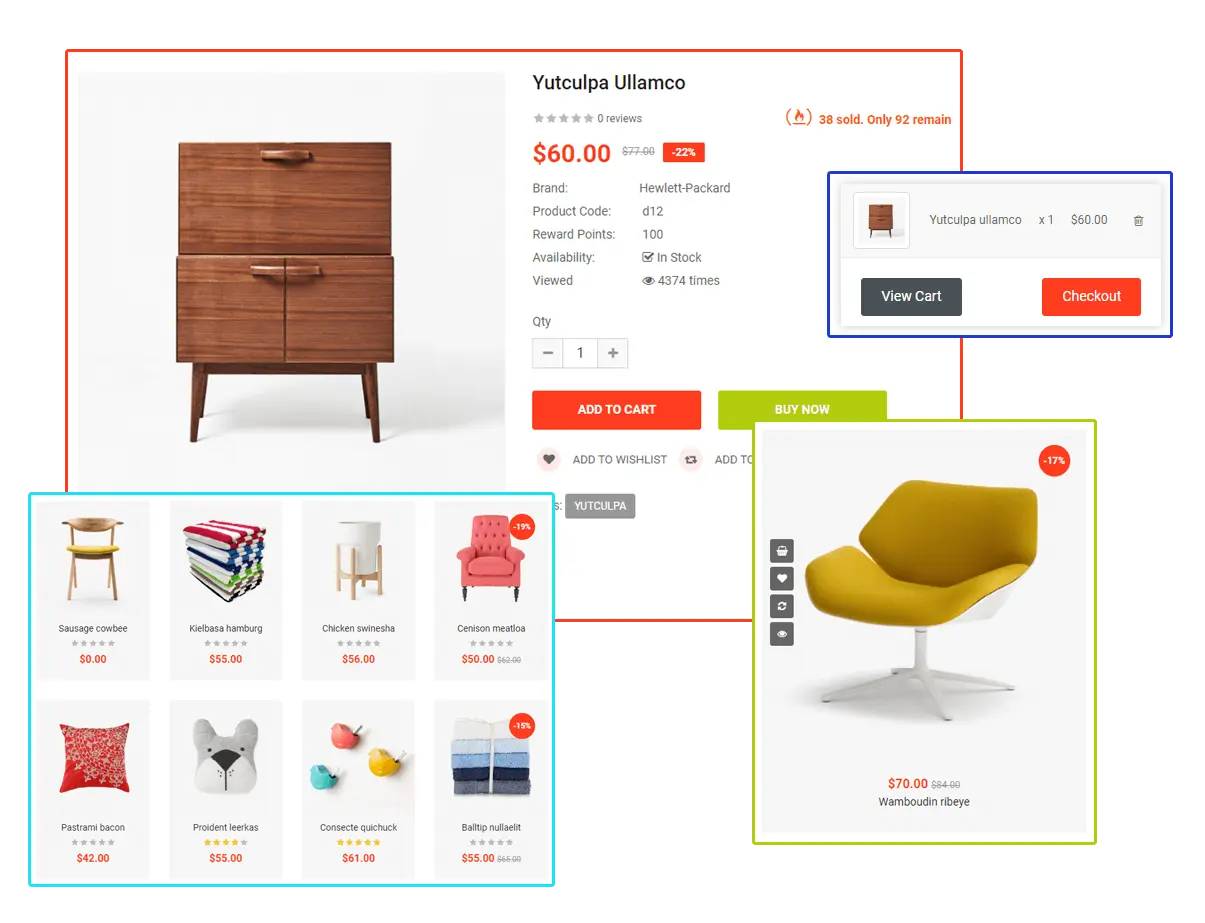



Store with order tracking
Members and customers buy from a store inside the platform, and every order is tracked after checkout.
→ Sales and binary volume never need reconciling between two systems.

Prime's binary MLM software matches left and right leg volume, applies your pair ratio and ceiling, and shows the carry-forward behind every payout. Your network can grow without the payout bill outrunning sales.
Illustrative, with a $1 = 1 BV assumption. In Prime these rules are set in Settings → System Configuration → Binary Commission.
A binary MLM plan places every member’s downline into two legs, left and right. Commission is paid on matched volume: the weaker leg sets how much pairs, and the unmatched volume on the stronger leg is carried forward.
That makes a binary plan simple to explain and fast to grow, because spillover from above can fill a member’s legs. It also makes it the plan most likely to overpay, which is why binary MLM software has to handle pairing, carry-forward and caps exactly.
Six things MLM owners tell us worry them about running a binary plan, and the screen in Prime that deals with each one.
“A binary plan can pay out more than the business brings in.”
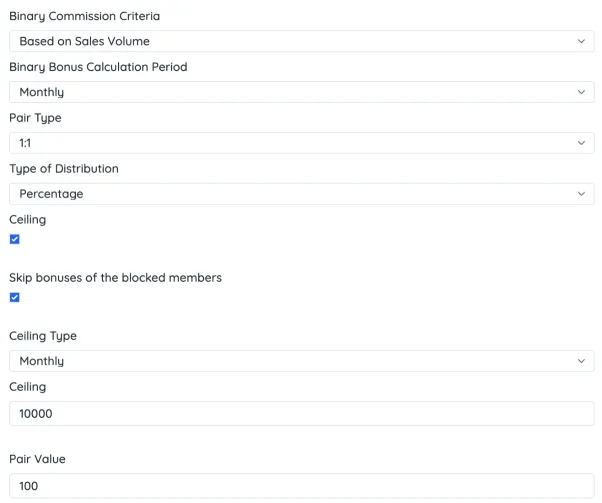
Set a ceiling on binary earnings and choose whether it resets daily, weekly or monthly. Add a pair value and pay each pair as a flat amount or a percentage, calculated instantly, daily, weekly or monthly.
Settings → System Configuration → Binary Commission“Members will argue about their carry-forward.”
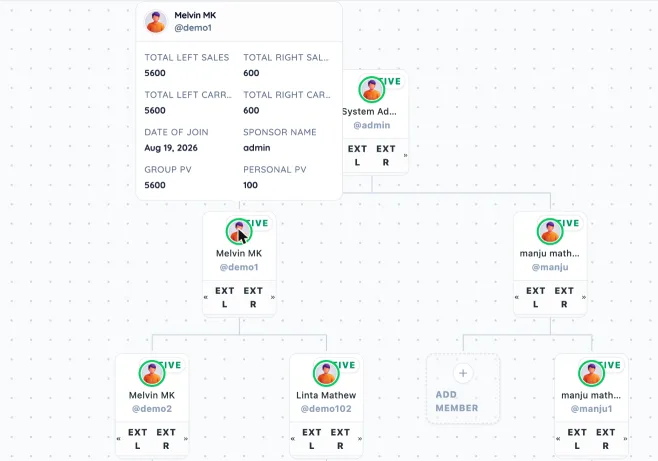
Every member in the binary tree shows total left and right sales, left and right carry-forward, group PV and personal PV. Support settles a carry-forward question by opening one card.
Network → Genealogy Tree (hover any member)“One wrong placement and the whole tree is off.”
Left or right is chosen at sign-up, open positions show as “Add member” in the tree, and EXT L / EXT R jump to the outer edge of either leg. New registrations and upgrades can wait in an approval queue first.
Signup · Network → Genealogy Tree · Manage Approval“We keep paying members we’ve already blocked.”
Switch on “Skip bonuses of the blocked members” and a blocked account stops earning binary commission straight away, with no manual correction on payday.
Settings → System Configuration → Binary Commission“Our plan pays 2:1 on the first pair, then 1:1.”
Pair type supports 1:1, or 2:1 then 1:1. Pay on sales volume or on sales price, and set a different bonus percentage for each joining package.
Settings → System Configuration → Binary Commission“We only find out what the plan costs after payday.”
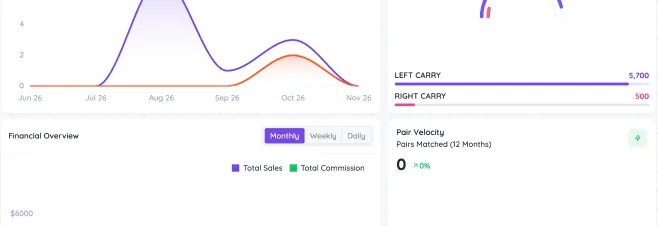
The dashboard shows left and right carry, pairs matched over 12 months and the volume lost to capping. The commission report filters to binary commission and exports to Excel.
Dashboard · Report → Commission ReportCheck every one of these screens yourself, free, in about two minutes.
Get the demo loginsNo sign-up and no sales call. Open the demo, pick a login, and look at the same admin panel and distributor back-office your team would use.
Binary settings, the binary tree, approvals, payouts and every report.
admin
admin123
A member’s own legs, carry-forward, earnings and wallet.
demo1
123456
The demo is shared with other visitors, so some data and settings may have been changed.
Binary commission does the heavy lifting. Six more bonuses are switched on and set separately, so you can reward recruiting, leadership and reorders as well.
| Bonus | What it pays | Why it matters |
|---|---|---|
| Binary commission | Pays on matched left and right volume, using your pair type, pair value, ceiling and calculation period. | The core of the plan, with the cost controls built into the same screen. |
| Referral commission | Pays the sponsor when they personally enrol a new member. | Rewards recruiting on day one, before the new member’s legs are built. |
| Matching bonus | Pays a sponsor a share of what the members they enrolled earn. | Leaders are paid to develop their team, not just to recruit. |
| Level commission | Pays on volume from members down a set number of levels. | Adds a depth reward to a two-leg plan, if your plan uses one. |
| Repurchase level bonus | Pays on repeat orders, level by level. | Keeps distributors focused on reorders, the volume a binary plan needs. |
| Pool bonus | Shares a set percentage of company turnover among qualifying ranks. | A shared goal for top ranks that you can budget in advance. |
| Rank bonus | Pays when a member reaches a rank in your rank table. | Gives every member a visible next step. |
These are the binary commission settings in the live demo. Change one and the next cycle is calculated with it.
Beyond the standard settings, Prime sets up these binary rules for your plan as part of the project.
Have a plan document? We’ll map it to these settings before your demo.
Book my free demo →“We went from the beginning to the end without any complicated situation.”

“It has proven to be a game-changer.”

“Security is paramount in MLM business operations, and Prime MLM Software takes this seriously.”




The pairing engine keeps the plan affordable. These modules keep members buying, asking fewer questions and coming back.
An AI co-pilot in the distributor back-office. Members ask in plain words and get answers from their own data.
Shows a member’s current rank, every condition for the next one, and which of them are already met.
→ Members know what to do next, without waiting for their upline to work it out.
Admins upload the compensation plan. Members read it and ask PrimeAI about anything that’s unclear, such as how carry-forward works.
→ Binary rules get explained the same way every time, at any hour.
Members ask how many active downlines they have and get the number at once.
→ Leaders see team activity without building a report.
Members browse catalogues and place orders in the chat.
→ Reordering takes one message, and reorders are the volume that fills both legs.
PrimeAI recovers passwords and raises tickets on the member’s behalf.
→ Fewer routine requests reach your support team.
You’re Silver. Gold has three conditions, and two are met:
A built-in e-commerce store, so every order lands in the same system that matches the legs.
Members and customers buy from a store inside the platform, and every order is tracked after checkout.
→ Sales and binary volume never need reconciling between two systems.
Invoices for each order, with ShipStation for shipping and Avalara for tax. Either can be swapped for tools you already use.
→ Your fulfilment and tax setup stays as it is.
Common, trusted payment gateways, including Stripe and PayPal.
→ Buyers pay the way they already trust, so fewer orders stall at checkout.
The store and back-office run in multiple countries, currencies and languages.
→ Members in a new country join the same tree, not a separate system.
The day-to-day tools for running a two-leg network.
Searchable by username, zoomable, with a card on every member showing leg sales and carry-forward.
→ Placement and volume questions are answered from one screen.
Who enrolled whom, kept apart from where they were placed.
→ Referral and matching bonuses follow the sponsor, even after spillover.
Choose the leg at sign-up and see open positions in the tree.
→ New members land where your plan says they should.
Registrations and package upgrades can wait for approval.
→ Fake sign-ups never reach a leg or start creating volume.
Packages and repeat-order products, each with its own price, volume and bonus %.
→ Change an offer without touching the pairing rules.
Binary and other commissions are credited to a wallet with full history, alongside fund transfers.
→ Members see each pair’s earnings as soon as it’s calculated.
Active, released, cancelled, deleted and inactive payouts, each kept separately.
→ You can prove what was requested, paid and refused.
Ranks set by referrals, group PV and personal PV, with rank commission and a global sales bonus.
→ Rank rewards and binary pay work from the same volume.
A dedicated forecasting view, separate from the main dashboard.
→ Plan stock and payout cash before the cycle closes.
Every member gets a referral link and a page set up by head office.
→ Members recruit on-brand, into the right leg.
Support tickets by subject, company news, events and internal mail.
→ Your field hears from you directly, not through rumours.
Block, unblock and edit members, with every admin action logged.
→ Act on a compliance problem fast, with a record of who did what.
A clear sequence, so the first cycle pays exactly what your plan says.
We map your pair ratio, caps, carry-forward rules and bonuses.
Your rules go into the binary settings, plus any custom work.
Sample volume is run through the plan to check every payout.
Members, legs and balances come across from your old system.
Your first cycle runs, with 24/7 support behind it.
Our Unilevel MLM software can be hosted on AWS, Hetzner or your own server. It is designed to handle large networks and heavy month-end commission runs without slowing down.
Book a free, personalised demo. Bring your plan document and we'll show your pairing, caps and carry-forward working in Prime, and what needs custom work.
Binary plan · Admin and distributor walkthrough